Filecoin Pin for ERC-8004 Agents
Learn how to register a trustless autonomous agent on the ERC-8004 Identity Registry with verifiable persistent storage using Filecoin Pin for the agent registration file.
Overview
This tutorial walks you through registering an ERC-8004 compliant agent with cryptographically-verified persistent storage on Filecoin. You'll create an agent card (metadata describing your agent's capabilities), store it on Filecoin & IPFS using Filecoin Pin, and register it on-chain as an NFT on Base Sepolia.
What you'll learn:
- How to create an ERC-8004 compliant agent card
- How to use Filecoin Pin for persistent, verifiable storage
- How to register an agent on the ERC-8004 Identity Registry
- How to verify Filecoin storage proofs and on-chain registration
What you'll build: A GitHub Integration Agent that references GitHub's official MCP server, demonstrating how real-world services can be integrated with ERC-8004.
Example Code and Scripts
For example code and helper scripts to help with using Filecoin Pin and agent registration, check out the quickstart repository:
GitHub Repository: FilOzone/FilecoinPin-for-ERC8004
Why Filecoin Pin for Agent Storage?
Agent cards need persistent storage with provable guarantees. Unlike generic IPFS pinning services that may stop hosting your data without notice, Filecoin Pin provides:
- ✅ Cryptographic proof your data is stored (daily PDP proofs)
- ✅ Ongoing verification ensures storage persistence
- ✅ Decentralized storage across a global network
- ✅ IPFS compatible - works with existing tools and gateways
- ✅ Crypto payments - onchain payments
- ✅ Limited time - sponsored storage coming soon available for ERC-8004 builders
Prerequisites
Required Tools
Before starting, you'll need:
Filecoin Pin CLI - Follow the complete setup guide here:
- Filecoin Pin CLI Tutorial
- This covers wallet creation, testnet tokens (tFIL and USDFC), and payment setup
Foundry - Ethereum development toolkit for contract interactions
curl -L https://foundry.paradigm.xyz | bash
foundryup
jq (optional but recommended) - JSON processor for viewing outputs
# macOS
brew install jq

# Ubuntu/Debian
sudo apt-get install jq
Required Tokens
You'll need testnet tokens on two networks:
Filecoin Calibration Testnet
- tFIL (testnet Filecoin) - For gas fees
- Request tFIL from Filecoin Calibration Faucet
- Amount requested: 100 tFIL
- USDFC (Filecoin stablecoin) - For storage payments
- Request test USDFC from Filecoin Calibnet USDFC Faucet
- Or Mint at USDFC website (requires tFIL as collateral)
- Amount needed: ~5 USDFC
Base Sepolia Testnet
- Sepolia ETH - For NFT minting and registration
- Request test ETH on Base Sepolia on Faucet
- Amount needed: ~0.001 ETH
NOTE! The same Ethereum wallet works on both Filecoin Calibration and Base Sepolia. You only need one private key.
ERC-8004 Registry Address
We'll be using the reference ERC-8004 Identity Registry deployed on the Base Sepolia testnet:
0x8004A818BFB912233c491871b3d84c89A494BD9e
Step 1: Create Your Agent Card
An agent card is a JSON file that describes your agent's capabilities, endpoints, and trust model according to the ERC-8004 specification.
Create the Agent Card JSON
Create a file named github-agent-card.json:
cat > github-agent-card.json << 'EOF'
{
  "type": "https://eips.ethereum.org/EIPS/eip-8004#registration-v1",
  "name": "GitHub Integration Agent",
  "description": "AI agent providing GitHub repository, issue, and pull request management capabilities through GitHub's official MCP server. Enables automated code review, issue triage, PR management, and repository analysis.",
  "image": "https://github.githubassets.com/images/modules/logos_page/GitHub-Mark.png",
  "endpoints": [
    {
      "name": "MCP",
      "endpoint": "https://api.githubcopilot.com/mcp/",
      "version": "1.0.0",
      "capabilities": {
        "tools": [
          {
            "name": "repository_management",
            "description": "Browse code, search files, analyze commits across GitHub repositories"
          },
          {
            "name": "issue_management",
            "description": "Create, update, search, and manage GitHub issues with AI assistance"
          },
          {
            "name": "pull_request_management",
            "description": "Review PRs, manage approvals, merge conflicts, and code reviews"
          }
        ]
      }
    },
    {
      "name": "agentWallet",
      "endpoint": "eip155:84532:0x0000000000000000000000000000000000000000"
    }
  ],
  "registrations": [],
  "supportedTrust": [
    "reputation"
  ]
}
EOF
Validate the JSON
Verify your agent card is valid JSON:
jq . github-agent-card.json
You should see the formatted JSON output with syntax highlighting.
Understanding the Agent Card Structure
Key fields in the agent card:
type- Links to the ERC-8004 specification versionname- Human-readable name for your agentdescription- What the agent doesimage- Avatar or logo URLendpoints- Array of service endpoints:- MCP endpoint - Points to GitHub's official MCP server
- agentWallet - The agent's wallet address (chain:chainId:address format)
capabilities- Tools and functions the agent providessupportedTrust- Trust mechanisms (reputation, stake, etc.)
💡 Note: This example uses GitHub's real public MCP server at
https://api.githubcopilot.com/mcp/. You can replace this with your own MCP server endpoint.
Step 2: Upload to Filecoin Pin
Now we'll store the agent card on Filecoin with PDP proofs.
Setup Payment System
If this is your first time using Filecoin Pin, set up the payment system:
export PRIVATE_KEY="0x..."  # Your wallet private key
filecoin-pin payments setup --auto
This configures your wallet to pay for storage automatically. This may take a few minutes to complete.
You'll see output similar to:
filecoin-pin payments setup --auto
┌  Filecoin Onchain Cloud Payment Setup
│
│  Running in auto mode...
│
◇  ✓ Connected to calibration
│
◇  ✓ Balance check complete
│
│  Account:
│    Wallet: 0x44896a716F7b5Ed343C6962b3D56FaA5377Cd052
│    Network: calibration
│  Balances:
│    FIL: 354.9996 tFIL
│    USDFC wallet: 199.6428 USDFC
│    USDFC deposited: 0.0000 USDFC
│
◇  ✓ Deposited 1.0000 USDFC
│
│  Transaction details:
│    Deposit: 0x3b9cb71e21c9df895c9a2f50df437e0dfa5cf00d20bff6cf6deea0c231b5b128
│
◇  ━━━ Configuration Summary ━━━
│
│  Network: calibration
│  Deposit: 1.0000 USDFC
│  Storage: ~372.4 GiB for 1 month
│  Status: Ready to upload
│
└  Payment setup completed successfully
NOTE! You only need to run this once per wallet. Subsequent uploads will use the existing payment configuration.
Upload Your Agent Card
Upload the agent card to Filecoin:
filecoin-pin add --auto-fund github-agent-card.json
The --auto-fund flag ensures your storage provider wallet has sufficient funds.
You'll see output similar to:
filecoin-pin add --auto-fund github-agent-card.json
┌  Filecoin Pin Add
│
◇  ✓ File validated (1.3 KiB)
│
◇  ✓ Connected to calibration
│
◇  ✓ Minimum payment setup verified (~0.066 USDFC required)
│
◇  ✓ File packed with root CID: bafybeihhal5hlbylkibniig6j72wdrm7lr4nf6z47natleh2jkyosrg7di
│
◇  ✓ IPFS content loaded (1.5 KiB)
│
◇  ✓ Funding requirements met
│
◑  Creating storage context..Provider 0xB709A785c765d7d3F7d94dbA367DA6a611D7972b failed ping test: fetch failed
◇  ✓ Storage context ready
│
│  Storage Context
│
│    Data Set ID: undefined
│    Provider: pspsps-calibnet
│
◇  ━━━ Add Complete ━━━
│
│  Network: calibration
│
│  Add Details
│    File: github-agent-card.json
│    Size: 1.5 KiB
│    Root CID: bafybeihhal5hlbylkibniig6j72wdrm7lr4nf6z47natleh2jkyosrg7di
│
│  Filecoin Storage
│    Piece CID: bafkzcibdricannieziik7jobrwqia4qfq6g7cwxfspsppv5aa76uev4u6ek7awz5
│    Piece ID: 0
│    Data Set ID: 11653
│
│  Storage Provider
│    Provider ID: 11
│    Name: pspsps-calibnet
│    Direct Download URL: https://calibnet.pspsps.io/piece/bafkzcibdricannieziik7jobrwqia4qfq6g7cwxfspsppv5aa76uev4u6ek7awz5
│
└  Add completed successfully
NOTE! Data storage on the Calibration Testnet has a retention period of approximately 1 week. For production use and to ensure your data remains available, please switch to Filecoin mainnet.
Save Important Values
Copy these values from the output - you'll need them later:
- Root CID - The IPFS content identifier (e.g.,
bafybeihhal5hlbylkibniig6j72wdrm7lr4nf6z47natleh2jkyosrg7di). - Dataset ID - For checking PDP proof status (e.g.,
11653)
⚠️ IMPORTANT: The Token URI for ERC-8004 registration must include the filename! Format it as:
ipfs://<ROOT_CID>/github-agent-card.json
Verify IPFS Retrieval
Test that your agent card is accessible via IPFS (it may take a few minutes to propagate!):
# Replace <ROOT_CID> with your actual CID
curl -s "https://ipfs.io/ipfs/<ROOT_CID>/github-agent-card.json" | jq .
You should see your agent card JSON returned:
curl -s "https://ipfs.io/ipfs/bafybeihhal5hlbylkibniig6j72wdrm7lr4nf6z47natleh2jkyosrg7di/github-agent-card.json" | jq .
{
  "type": "https://eips.ethereum.org/EIPS/eip-8004#registration-v1",
  "name": "GitHub Integration Agent",
  "description": "AI agent providing GitHub repository, issue, and pull request management capabilities through GitHub's official MCP server. Enables automated code review, issue triage, PR management, and repository analysis.",
  "image": "https://github.githubassets.com/images/modules/logos_page/GitHub-Mark.png",
  "endpoints": [
    {
      "name": "MCP",
      "endpoint": "https://api.githubcopilot.com/mcp/",
      "version": "1.0.0",
      "capabilities": {
        "tools": [
          {
            "name": "repository_management",
            "description": "Browse code, search files, analyze commits across GitHub repositories"
          },
          {
            "name": "issue_management",
            "description": "Create, update, search, and manage GitHub issues with AI assistance"
          },
          {
            "name": "pull_request_management",
            "description": "Review PRs, manage approvals, merge conflicts, and code reviews"
          }
        ]
      }
    },
    {
      "name": "agentWallet",
      "endpoint": "eip155:84532:0x0000000000000000000000000000000000000000"
    }
  ],
  "registrations": [],
  "supportedTrust": [
    "reputation"
  ]
}
Step 3: Register on Base Sepolia
Now we'll register the agent on-chain as an ERC-8004 NFT on Base Sepolia.
Set Environment Variables
export PRIVATE_KEY="0x..."  # Your wallet private key
export TOKEN_URI="ipfs://<ROOT_CID>/github-agent-card.json"  # From Step 2
export IDENTITY_REGISTRY="0x8004A818BFB912233c491871b3d84c89A494BD9e"
export BASE_SEPOLIA_RPC="https://sepolia.base.org"
⚠️ SECURITY WARNING: Never commit your private key to version control or share it publicly.
Check Your Balance
Ensure you have sufficient Base Sepolia ETH:
cast balance <YOUR_WALLET_ADDRESS> --rpc-url $BASE_SEPOLIA_RPC --ether
You should have at least 0.001 ETH for the registration transaction.
Register the Agent
Send the registration transaction:
cast send $IDENTITY_REGISTRY \
  "register(string)" \
  "$TOKEN_URI" \
  --rpc-url $BASE_SEPOLIA_RPC \
  --private-key $PRIVATE_KEY
You'll see output similar to:
cast send $IDENTITY_REGISTRY \
  "register(string)" \
  "$TOKEN_URI" \
  --rpc-url $BASE_SEPOLIA_RPC \
  --private-key $PRIVATE_KEY

blockHash            0x8699f29397c8b6b921d5e3f754220fa84ba049a0cfed875dc5deffcfd5f5dcb9
blockNumber          37478106
contractAddress
cumulativeGasUsed    6675540
effectiveGasPrice    1200000
from                 0x44896a716F7b5Ed343C6962b3D56FaA5377Cd052
gasUsed              200928
logs                 [{"address":"0x8004a818bfb912233c491871b3d84c89a494bd9e","topics":["0xddf252ad1be2c89b69c2b068fc378daa952ba7f163c4a11628f55a4df523b3ef","0x0000000000000000000000000000000000000000000000000000000000000000","0x00000000000000000000000044896a716f7b5ed343c6962b3d56faa5377cd052","0x000000000000000000000000000000000000000000000000000000000000018e"],"data":"0x","blockHash":"0x8699f29397c8b6b921d5e3f754220fa84ba049a0cfed875dc5deffcfd5f5dcb9","blockNumber":"0x23bdeda","blockTimestamp":"0x698b1c94","transactionHash":"0x0edda2928ec45aaa4091a2fa2cc863f249e78b86931aed31e2c5365d3b99175c","transactionIndex":"0x13","logIndex":"0xe0","removed":false},{"address":"0x8004a818bfb912233c491871b3d84c89a494bd9e","topics":["0xf8e1a15aba9398e019f0b49df1a4fde98ee17ae345cb5f6b5e2c27f5033e8ce7"],"data":"0x000000000000000000000000000000000000000000000000000000000000018e","blockHash":"0x8699f29397c8b6b921d5e3f754220fa84ba049a0cfed875dc5deffcfd5f5dcb9","blockNumber":"0x23bdeda","blockTimestamp":"0x698b1c94","transactionHash":"0x0edda2928ec45aaa4091a2fa2cc863f249e78b86931aed31e2c5365d3b99175c","transactionIndex":"0x13","logIndex":"0xe1","removed":false},{"address":"0x8004a818bfb912233c491871b3d84c89a494bd9e","topics":["0xca52e62c367d81bb2e328eb795f7c7ba24afb478408a26c0e201d155c449bc4a","0x000000000000000000000000000000000000000000000000000000000000018e","0x00000000000000000000000044896a716f7b5ed343c6962b3d56faa5377cd052"],"data":"0x00000000000000000000000000000000000000000000000000000000000000200000000000000000000000000000000000000000000000000000000000000059697066733a2f2f626166796265696868616c35686c62796c6b69626e696967366a37327764726d376c72346e66367a34376e61746c6568326a6b796f7372673764692f6769746875622d6167656e742d636172642e6a736f6e00000000000000","blockHash":"0x8699f29397c8b6b921d5e3f754220fa84ba049a0cfed875dc5deffcfd5f5dcb9","blockNumber":"0x23bdeda","blockTimestamp":"0x698b1c94","transactionHash":"0x0edda2928ec45aaa4091a2fa2cc863f249e78b86931aed31e2c5365d3b99175c","transactionIndex":"0x13","logIndex":"0xe2","removed":false},{"address":"0x8004a818bfb912233c491871b3d84c89a494bd9e","topics":["0x2c149ed548c6d2993cd73efe187df6eccabe4538091b33adbd25fafdb8a1468b","0x000000000000000000000000000000000000000000000000000000000000018e","0x2ac6109326e720d1435c0db66f7e35eda7839f52b6f1f5520a60788e132b4e39"],"data":"0x00000000000000000000000000000000000000000000000000000000000000400000000000000000000000000000000000000000000000000000000000000080000000000000000000000000000000000000000000000000000000000000000b6167656e7457616c6c6574000000000000000000000000000000000000000000000000000000000000000000000000000000000000000000000000000000001444896a716f7b5ed343c6962b3d56faa5377cd052000000000000000000000000","blockHash":"0x8699f29397c8b6b921d5e3f754220fa84ba049a0cfed875dc5deffcfd5f5dcb9","blockNumber":"0x23bdeda","blockTimestamp":"0x698b1c94","transactionHash":"0x0edda2928ec45aaa4091a2fa2cc863f249e78b86931aed31e2c5365d3b99175c","transactionIndex":"0x13","logIndex":"0xe3","removed":false}]
logsBloom            0x00000000000000000000000000000000000000000000000000000000000000000000000080000000001000000000010200000000000000000000000000000000000000000000000000000008000080000000000000000000000000000000000000000000a20000000000000008000800000000000000000000000010000000000000000000100000000000000000000080000000000000000000000000000000000000000000000040000000000000002000000000000000010000000000008000000002000000002000000000000000000000000000000000800000000020000000081000010000200000000000000000000000000000000000000004000000
root
status               1 (success)
transactionHash      0x0edda2928ec45aaa4091a2fa2cc863f249e78b86931aed31e2c5365d3b99175c
transactionIndex     19
type                 2
blobGasPrice
blobGasUsed          46176
to                   0x8004A818BFB912233c491871b3d84c89A494BD9e
daFootprintGasScalar 312
l1BaseFeeScalar      1101
l1BlobBaseFee        63508363
l1BlobBaseFeeScalar  659851
l1Fee                8679909892
l1GasPrice           928642664
l1GasUsed            2383
A status of 1 means the transaction succeeded and your agent NFT was minted!
Get Your Agent ID
Your agent ID is the token ID of the ERC-721 NFT that was minted when you registered. You can extract it from the transaction logs with cast and jq (install jq if needed, e.g. brew install jq on macOS):
- Set
TX_HASHto thetransactionHashfrom yourcast sendoutput (e.g.0x0edda2928ec45aaa4091a2fa2cc863f249e78b86931aed31e2c5365d3b99175c). - Get the receipt and read the Transfer event's
tokenId(fourth topic):
export TX_HASH="0x..."   # from your cast send output

# Extract agent ID (token ID) from the Transfer event in the receipt logs
AGENT_ID=$(cast receipt $TX_HASH --rpc-url $BASE_SEPOLIA_RPC --json \
  | jq -r '.logs[] | select(.topics[0] == "0xddf252ad1be2c89b69c2b068fc378daa952ba7f163c4a11628f55a4df523b3ef") | .topics[3]' \
  | head -1 \
  | xargs cast --to-dec)
echo "Agent ID: $AGENT_ID"
This filters logs for the ERC-721 Transfer event and converts the tokenId topic to decimal. Use $AGENT_ID in the Verify Registration step below.
Alternative: You can also look up the transaction on BaseScan (Base Sepolia) → Logs tab → Transfer or Registered event, and read the tokenId / agentId from the event (e.g. example transaction shows token ID 398).
Verify Registration
Confirm your agent is registered correctly using the agent ID from the previous step (use $AGENT_ID if you extracted it with cast, or the value you read from BaseScan):
cast call $IDENTITY_REGISTRY \
  "tokenURI(uint256)" \
  $AGENT_ID \
  --rpc-url $BASE_SEPOLIA_RPC
You will get ABI-encoded output similar to:
0x00000000000000000000000000000000000000000000000000000000000000200000000000000000000000000000000000000000000000000000000000000059697066733a2f2f626166796265696868616c35686c62796c6b69626e696967366a37327764726d376c72346e66367a34376e61746c6568326a6b796f7372673764692f6769746875622d6167656e742d636172642e6a736f6e00000000000000
The output is ABI-encoded. Decode it:
cast --abi-decode "f()(string)" <OUTPUT_FROM_ABOVE>
You should see your Token URI returned: ipfs://<ROOT_CID>/github-agent-card.json:
cast --abi-decode "f()(string)" 0x00000000000000000000000000000000000000000000000000000000000000200000000000000000000000000000000000000000000000000000000000000059697066733a2f2f626166796265696868616c35686c62796c6b69626e696967366a37327764726d376c72346e66367a34376e61746c6568326a6b796f7372673764692f6769746875622d6167656e742d636172642e6a736f6e00000000000000
"ipfs://bafybeihhal5hlbylkibniig6j72wdrm7lr4nf6z47natleh2jkyosrg7di/github-agent-card.json"
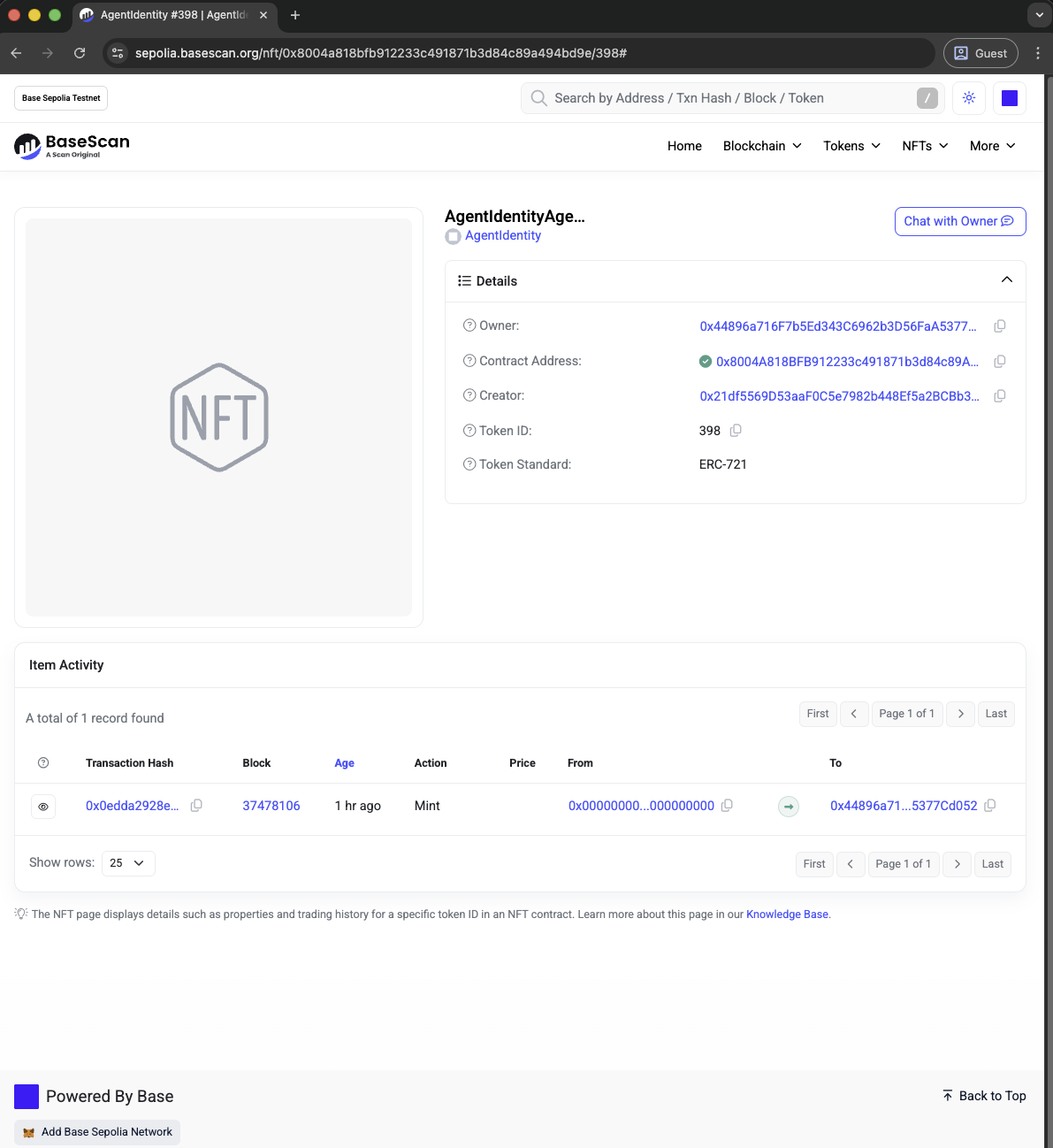
View on Block Explorer
Visit your agent on the Base Sepolia block explorer:
https://sepolia.basescan.org/nft/0x8004a818bfb912233c491871b3d84c89a494bd9e/<AGENT_ID_DECIMAL>
Replace <AGENT_ID_DECIMAL> with your agent's ID (e.g., 398).
Step 4: Check On-chain Storage Proofs
Finally, let's verify that your agent card is persistently stored with cryptographic proofs.
Check PDP Proof Status
Use the Dataset ID from Step 2:
filecoin-pin data-set show 11653 # Replace with your Dataset ID
You'll see output like:
filecoin-pin data-set show 11653
┌  Filecoin Onchain Cloud Data Set Details for #11653
│
◇  ━━━ Data Set ━━━
│
│  Network: calibration
│  Client address: 0x44896a716F7b5Ed343C6962b3D56FaA5377Cd052
│
│  #11653
│    Status: live
│    CDN add-on: disabled
│
│    Provider
│      ID: 11
│      Address: 0x682467D59F5679cB0BF13115d4C94550b8218CF2
│      Name: pspsps-calibnet
│      Description: herding cats
│      Service URL: https://calibnet.pspsps.io
│      Active: yes
│      Location: C=DE;ST=Bavaria;L=Nuremberg
│
│    Metadata
│      source: "filecoin-pin"
│      withIPFSIndexing: ""
│
│    Payment
│      PDP rail ID: 12908
│      Payer: 0x44896a716F7b5Ed343C6962b3D56FaA5377Cd052
│      Payee: 0x682467D59F5679cB0BF13115d4C94550b8218CF2
│
│    Pieces
│      Total pieces: 1
│      Total size: 1.5 KiB
│      Unique PieceCIDs: 1
│      Unique IPFS Root CIDs: 1
│
│      #0 (active)
│        PieceCID: bafkzcibdricannieziik7jobrwqia4qfq6g7cwxfspsppv5aa76uev4u6ek7awz5
│        Size: 1.5 KiB
│        Metadata
│          ipfsRootCID: "bafybeihhal5hlbylkibniig6j72wdrm7lr4nf6z47natleh2jkyosrg7di"
│
│
└  Data set inspection complete
💡 Note: PDP proofs may take up to 24 hours to begin after initial upload. This is normal.
Summary
✅ Your agent is now:
- 🔒 Persistently stored on Filecoin with cryptographic PDP proofs
- 🌐 Registered on-chain as an ERC-8004 NFT on Base Sepolia
- 🔍 Discoverable via the Identity Registry by any third party
- ✅ Verifiable - anyone can check storage proofs and on-chain data
- 🚀 Ready to use by other agents and applications
Step 5: Deploy on Mainnet
Ready to move to production? This step covers deploying your agent on Filecoin mainnet and Base mainnet.
Required Tokens (Mainnet)
You'll need real tokens on two networks:
Filecoin Mainnet
- FIL - For gas fees on Filecoin
- USDFC - For storage payments
Get FIL and USDFC via the USDFC Bridge - bridge from any token on any network to FIL and USDFC on Filecoin mainnet. You can also use Sushi to swap FIL for USDFC.
Base Mainnet
- ETH - For NFT minting and registration on Base
ERC-8004 Registry Address (Base Mainnet)
0x8004A169FB4a3325136EB29fA0ceB6D2e539a432
View on explorer: Base Mainnet Registry
Upload to Filecoin Mainnet
All Filecoin Pin CLI commands use the --mainnet flag for mainnet operations.
Setup Payment System (Mainnet)
export PRIVATE_KEY="0x..."  # Your wallet private key
filecoin-pin payments setup --auto --mainnet
Upload Your Agent Card (Mainnet)
filecoin-pin add --auto-fund --mainnet github-agent-card.json
Save the Root CID and Dataset ID from the output.
Register on Base Mainnet
Set Environment Variables
export PRIVATE_KEY="0x..."  # Your wallet private key
export TOKEN_URI="ipfs://<ROOT_CID>/github-agent-card.json"  # From previous step
export IDENTITY_REGISTRY="0x8004A169FB4a3325136EB29fA0ceB6D2e539a432"
export BASE_MAINNET_RPC="https://mainnet.base.org"
Register the Agent
cast send $IDENTITY_REGISTRY \
  "register(string)" \
  "$TOKEN_URI" \
  --rpc-url $BASE_MAINNET_RPC \
  --private-key $PRIVATE_KEY
Verify Registration
export TX_HASH="0x..."   # from your cast send output

# Extract agent ID (token ID) from the Transfer event in the receipt logs
AGENT_ID=$(cast receipt $TX_HASH --rpc-url $BASE_MAINNET_RPC --json \
  | jq -r '.logs[] | select(.topics[0] == "0xddf252ad1be2c89b69c2b068fc378daa952ba7f163c4a11628f55a4df523b3ef") | .topics[3]' \
  | head -1 \
  | xargs cast --to-dec)
echo "Agent ID: $AGENT_ID"
Check Mainnet Storage Proofs
filecoin-pin data-set show <YOUR_DATASET_ID> --mainnet
Troubleshooting
Issue: filecoin-pin: command not found
Solution: Install the Filecoin Pin CLI:
npm install -g filecoin-pin@latest
Issue: Insufficient USDFC
Solution: Request more test USDFC at Filecoin Calibnet USDFC Faucet
Issue: Transaction reverted on Base Sepolia
Solution: Check your Base Sepolia ETH balance:
cast balance <YOUR_ADDRESS> --rpc-url https://sepolia.base.org --ether
Get more from the faucet if needed.
Issue: IPFS retrieval is slow or fails
Solution: IPFS propagation can take a few minutes. Try different gateways:
curl -s "https://ipfs.io/ipfs/<CID>/github-agent-card.json" | jq .
curl -s "https://gateway.pinata.cloud/ipfs/<CID>/github-agent-card.json" | jq .
curl -s "https://cloudflare-ipfs.com/ipfs/<CID>/github-agent-card.json" | jq .
Issue: PDP proofs not showing
Solution: PDP proofs can take up to 24 hours to begin after upload. This is normal - your data is still stored, proofs just take time to generate. Check back later with:
filecoin-pin data-set show <YOUR_DATASET_ID>
Issue: Token URI doesn't include filename
Solution: The Token URI must include the full path including filename. Correct format:
ipfs://<CID>/github-agent-card.json
If you registered with the wrong format, you'll need to register a new agent with the corrected Token URI.
What's Next?
Now that your agent is registered with verifiable persistent storage, you can:
Build Your Own Agent
- Create custom agent cards for your services
- Deploy your own MCP server and reference it in the agent card
- Register multiple agents for different capabilities
- Update agent cards by uploading new versions (CID changes) and updating on-chain
Explore ERC-8004 Features
- Reputation Registry - Build reputation for your agents
- Validation Registry - Add validators to verify agent behavior
- Multi-agent coordination - Discover and compose multiple agents
Join the Community
- Filecoin Builders: on telegram; on Slack
- ERC-8004 Discussion: GitHub Discussions
- Filecoin Pin: Documentation
- Builder Channels: Join ERC-8004 builder communities
Sponsored Storage for ERC-8004 Builders
Coming soon, stay tuned!
Additional Resources
- ERC-8004 Specification
- Reference Implementation
- Filecoin Pin CLI Tutorial
- Base Sepolia Explorer
- GitHub MCP Server
Happy building! 🚀